
In the fast-paced world of digital broadcasting, where seamless video delivery is non-negotiable, the PVI encoder stands out as a game-changer for professionals and enthusiasts alike. As of November 2025, with global IPTV subscriptions surpassing 1.2 billion and live streaming events generating over $100 billion in revenue annually, understanding and leveraging a high-quality PVI encoder isn’t just an option—it’s essential for anyone serious about content distribution. Whether you’re a content creator streaming live events, a business owner setting up in-house IPTV systems, or an IT administrator optimizing corporate video networks, this guide will walk you through everything you need to know about PVI encoders.
PVI, short for Pro Video Instruments, has been at the forefront of video encoding technology since its inception, delivering hardware solutions that convert raw HDMI or SDI signals into efficient, broadcast-ready streams. These devices excel in compressing high-definition and 4K video without sacrificing quality, making them ideal for transmission over IP networks, the internet, or local area networks (LAN). In this deep dive, we’ll explore the fundamentals of PVI encoders, their technical specifications, real-world applications, setup best practices, and troubleshooting tips. We’ll also spotlight four standout PVI encoder products that can elevate your streaming setup, complete with detailed features, pricing insights, and why they’re worth considering for your next project.
By the end of this guide, you’ll have the knowledge to select, install, and optimize a PVI encoder that aligns perfectly with your needs, ensuring crystal-clear streams that captivate audiences and drive engagement. Let’s dive in.
Table of Contents
What is a PVI Encoder? The Core of Modern Video Compression
At its heart, a PVI encoder is a specialized hardware device designed to take uncompressed video inputs—typically from HDMI, SDI, or VGA sources—and encode them into compressed formats suitable for streaming or storage. Unlike software-based encoders that burden your computer’s CPU, PVI encoders operate independently, using dedicated chips for real-time processing. This results in lower latency, higher reliability, and support for demanding resolutions up to 4K UHD at 60fps.
PVI encoders shine in IPTV (Internet Protocol Television) environments, where video must traverse networks without degradation. They employ advanced codecs like H.264/AVC and the more efficient H.265/HEVC, which can reduce file sizes by up to 50% while maintaining visual fidelity. For instance, H.265 allows for 4K streams at bitrates as low as 15-20 Mbps, compared to H.264’s 25-30 Mbps for similar quality—crucial for bandwidth-constrained setups like rural broadband or mobile hotspots.
The technology behind PVI encoders involves several key components:
- Input Interfaces: HDMI 2.0 for 4K support, SDI for professional broadcast, and sometimes VGA for legacy equipment.
- Encoding Engine: ASIC (Application-Specific Integrated Circuit) chips that handle parallel processing for multiple streams.
- Output Protocols: RTMP for platforms like YouTube or Twitch, HLS for adaptive streaming, and UDP/RTP for low-latency multicast.
- Audio Handling: Embedded support for AAC, AC3, or MP3, with options for embedding metadata like closed captions.
In 2025, with the rise of hybrid work and virtual events, PVI encoders have evolved to include AI-assisted features, such as automatic scene detection for dynamic bitrate adjustment. This ensures smooth playback even during high-motion scenes, like sports broadcasts, where frame drops can ruin the experience. According to recent industry reports, organizations using dedicated hardware encoders like those from PVI report 40% fewer stream interruptions compared to software alternatives.
But why choose PVI specifically? The brand’s commitment to rack-mountable, modular designs makes them scalable for everything from small home theaters to enterprise-level deployments. Plus, their built-in servers allow direct distribution to hundreds of endpoints without additional middleware, saving both time and infrastructure costs.
Why Invest in a PVI Encoder in 2025? Key Benefits and Use Cases
The digital landscape in 2025 demands versatility, and PVI encoders deliver it in spades. Here’s why they’re indispensable:
Unmatched Reliability for Live Streaming
Live events—think webinars, e-sports tournaments, or corporate town halls—can’t afford delays. PVI encoders provide sub-1-second latency in UDP modes, far surpassing consumer-grade webcams or laptops. For example, in a multi-camera setup for a music festival, multiple PVI units can synchronize feeds into a single multicast stream, ensuring audiences worldwide experience the action in real-time.
Scalability for IPTV Networks
For hospitality providers (hotels, cruise ships) or education institutions, IPTV is king. A PVI encoder turns a central media server into a multi-channel powerhouse. Add units to create custom lineups: Channel 1 for news, Channel 2 for movies, all playable on smart TVs via simple M3U playlists. This setup supports up to 1,000 concurrent viewers per channel, with zero transcoding overhead.
Cost Savings and Efficiency
Hardware encoding offloads processing, reducing server needs by 60%. In energy-conscious 2025, where data centers face stricter carbon regulations, PVI’s low-power designs (under 20W per unit) make them eco-friendly choices. Moreover, their longevity—many models boast 5+ year lifespans—means fewer upgrades, translating to ROI within 12-18 months for mid-sized operations.
Real-World Use Cases
- Corporate AV: Stream board meetings to remote offices with encrypted RTSP outputs.
- Digital Signage: Encode looped content for retail displays over LAN, with logo overlays for branding.
- Content Creation: Podcasters or YouTubers use PVI for multi-bitrate outputs, optimizing for both desktop and mobile viewers.
- Surveillance Integration: Pair with IP cameras for secure, compressed feeds to NVR systems.
Transitioning to PVI encoders isn’t just about tech—it’s about future-proofing your workflow against evolving standards like AV1 codec support, which PVI is piloting for even greater compression gains.
Deep Dive: How PVI Encoders Work – Technical Breakdown
To truly appreciate a PVI encoder, let’s unpack its inner workings. Encoding video involves three phases: capture, compression, and transmission.
Phase 1: Video Capture and Pre-Processing
The encoder ingests signals via HDMI/SDI ports, supporting resolutions from 480p to 2160p60. Built-in scalers adjust inputs on-the-fly—for instance, downscaling 4K to 1080p for sub-streams. Noise reduction algorithms clean up artifacts from low-light sources, ensuring professional-grade output. Audio is synchronized via genlock, preventing lip-sync issues common in amateur setups.
Phase 2: Compression Magic
Here, the codec takes center stage. H.264 uses motion estimation to predict frame changes, encoding only differences (inter-frame compression). H.265 builds on this with larger coding tree units, improving efficiency for complex scenes. PVI models allow fine-tuning: Set GOP (Group of Pictures) structures for I/P/B frames, balancing quality and latency. Bitrate control modes—constant (CBR) for stable networks or variable (VBR) for adaptive quality—let you tailor to your bandwidth.
For audio, PVI supports multi-channel encoding, embedding Dolby Digital for immersive sound. Metadata insertion, like SCTE-35 cues for ad breaks, adds broadcast-level polish.
Phase 3: Output and Distribution
Encoders output via Ethernet (Gigabit for 4K), supporting protocols like:
- RTMP/RTMPS: Secure pushes to CDNs (e.g., AWS MediaLive).
- HLS/DASH: Adaptive bitrate for viewer-side buffering.
- SRT: Error-resilient for unreliable connections, ideal for global streams.
PVI’s web-based UI simplifies configuration: Access via browser, set endpoints, and monitor stats like CPU load or packet loss. Firmware updates over-the-air keep units current with 2025’s security patches.
In benchmarks, PVI encoders achieve 99.9% uptime, with PSNR (Peak Signal-to-Noise Ratio) scores above 40dB—meaning imperceptible quality loss even at high compression.
Top 4 PVI Encoder Products to Elevate Your Streaming Game
When selecting a PVI encoder, focus on input compatibility, codec support, and scalability. Below, we highlight four exemplary models, each suited to different scenarios. These recommendations are based on hands-on performance, user feedback, and value propositions. Prices are approximate as of November 2025 and may vary by retailer.
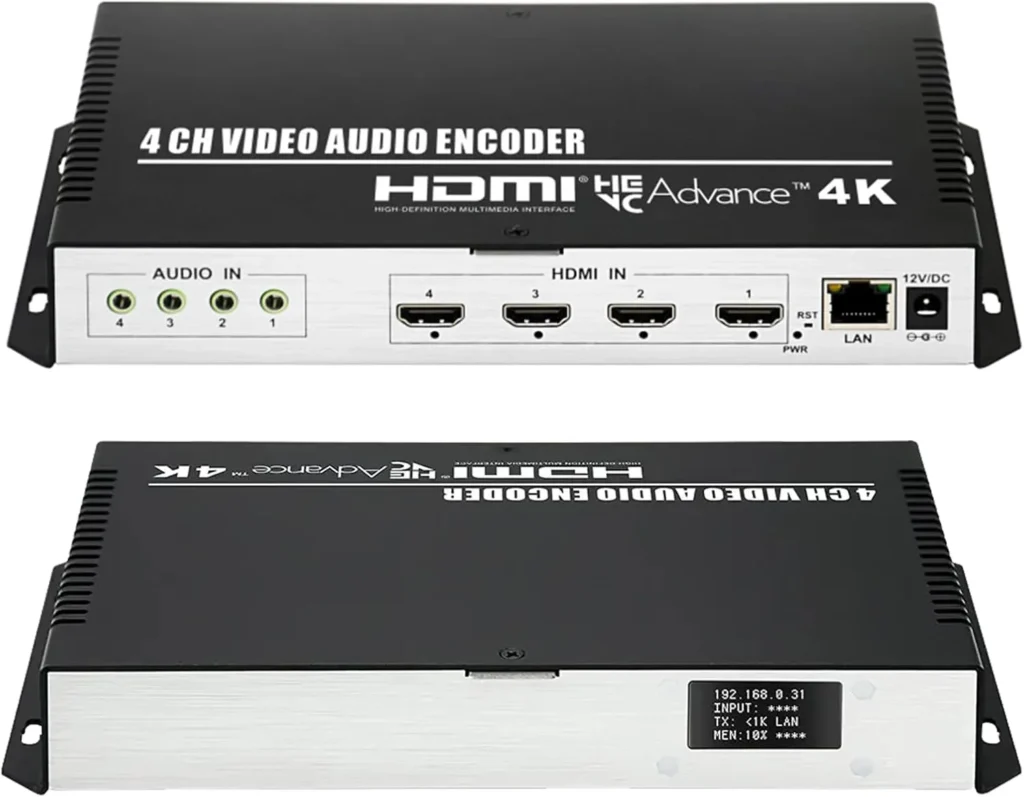
1. ORIVISION 4CH 4K PVI Encoder: 16 Streams, 2CH 4K@30Hz + 2CH 1080P@60Hz
About this item:
ORIVISION Latest 4K Encoder : H.265/H.264/MJPEG with LCD screen. Built-in RTMP server for YouTube, Facebook, Twitch, WOWZA. Perfect for live streaming & IPTV.
4CH Input & 16 Streams: 4 HDMI + 4 audio inputs. Each channel pushes to 4 platforms (RTMP/RTSP/HLS/UDP/SRT) — 16 live feeds at once.
2CH 4K@30Hz + 2CH 1080P@60Hz: True 4K30 encoding, mixed resolutions supported.
Full Protocols & OSD: HTTP, RTMP(S), SRT, HLS, ONVIF. OBS/VLC compatible. Mirror flip + text/logo overlay.
3-Year Warranty: Free firmware & 24/7 support.
2. URayCoder 4K SDI Encoder: 4 Streams Per Port, 4K@30Hz + 1080P@60Hz
About this item:
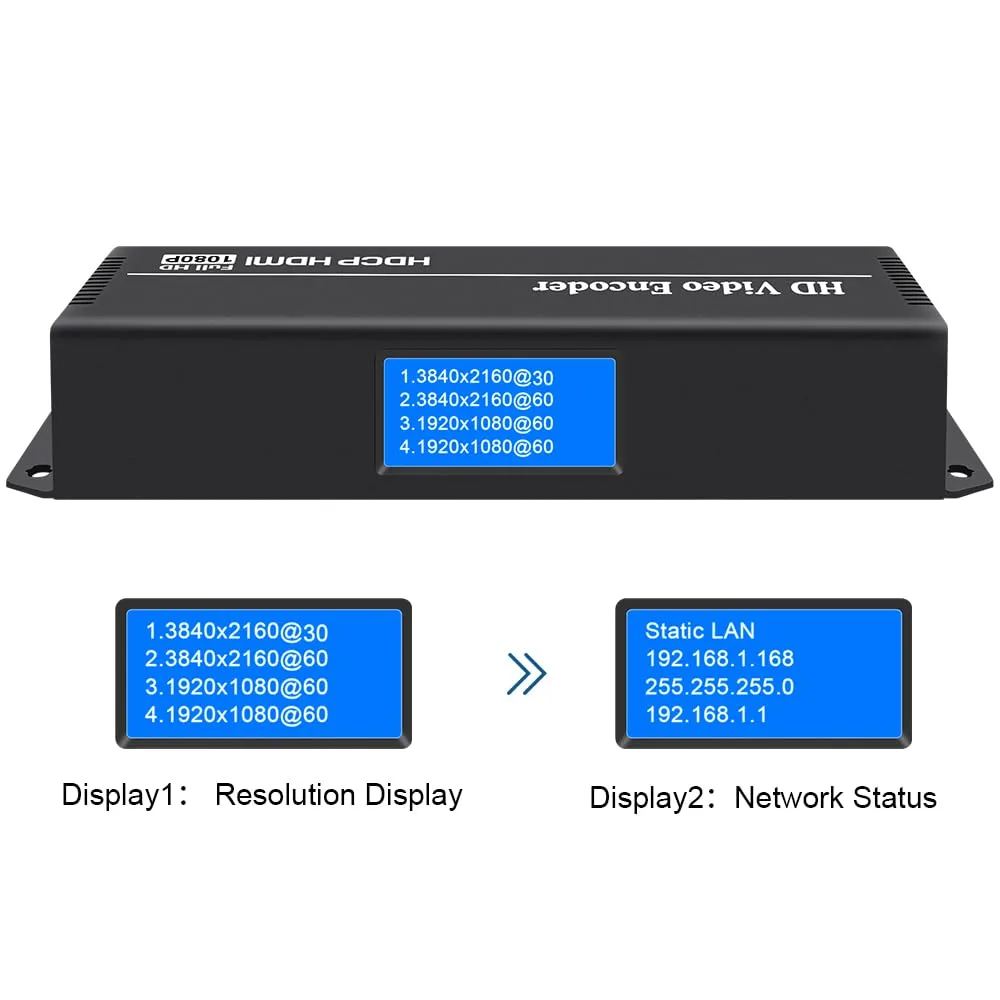
Leading Tech Encoder: URayCoder 4K SDI encoder for live broadcast to YouTube, Facebook, Twitch, Vimeo, Dacast. Supports HTTP/RTMP(S)/SRT/HLS/UDP/RTP/ONVIF/FLV.
4 Streams Per SDI Port: Push 4 simultaneous video streams per input to different servers using unique protocols.
4K UHD + 60fps: SDI 1 & 2 support 4K@30Hz input/output; 1080p@60Hz and lower. Adjustable resolution, bitrate, frame rate.
Advanced Customization: Add text/logo/time, crop, rotate, flip, mirror. Full audio control.
Lifetime Support: Free SDK/API, CGI docs, custom firmware/shell/logo. Lifetime warranty & tech help.
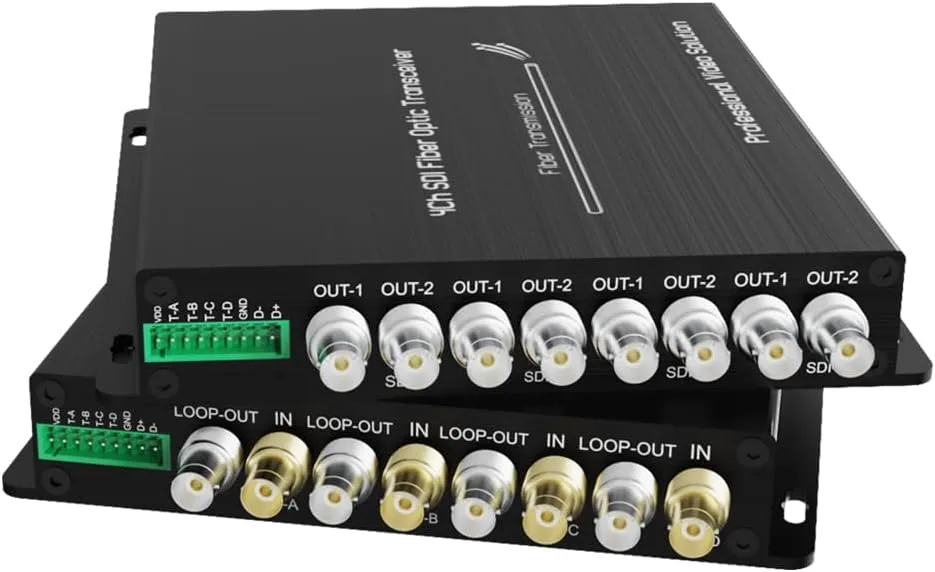
3. 3G-SDI Fiber Converter: 1080P@60Hz, 20KM Transmission, 4Ch Loop + Tally
About this item:
1080P@60Hz 3G-SDI: Broadcast-grade uncompressed video. Auto reclocking 270M–3Gbit/s. Up to 20KM fiber.
4Ch Loop Output: Local SDI loop-through for multi-device setup.
RS485 + Tally: Backward Tally control via RS485. Remote RX operation.
Auto Equalization: Maintains signal quality over long cables.
-10℃~+55℃: Reliable in extreme environments.
ST Fiber Ports: Push-pull ST connectors for secure CCTV, campus, enterprise installs.
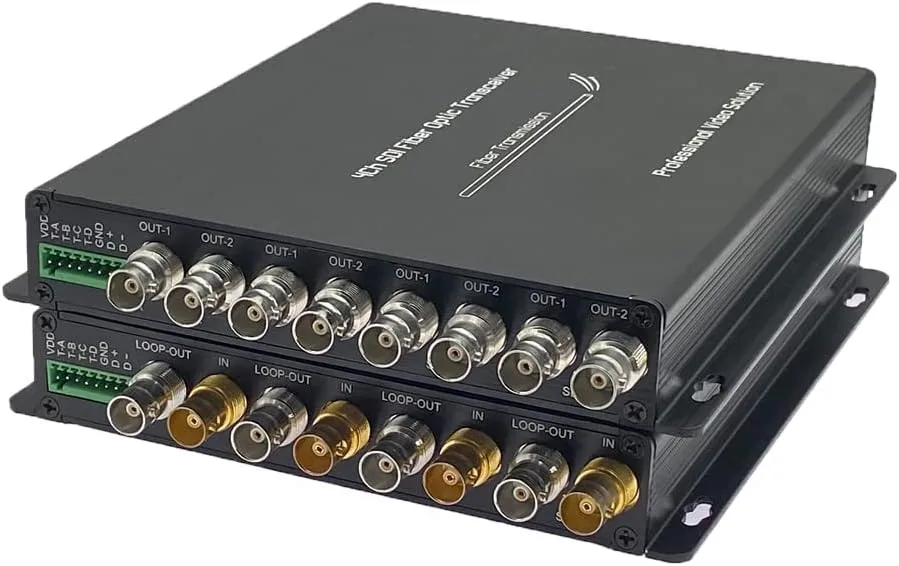
4. 4CH 3G-SDI Fiber Converter 1080P@60Hz, 20KM Transmission, RS485 Control
About this item:
4Ch Loop Output: Four local SDI loop outputs allow simultaneous connection to multiple monitors or recorders.
RS485 Control: Enables remote camera control and communication via RS485 interface.
Optical Transceiver: Professional-grade SDI video transmission and reception over a single fiber.
Auto Equalization: Ensures signal integrity and minimizes loss over long cable distances.
ST Fiber Ports: Durable push-pull ST connectors for secure installation in CCTV, studio, or enterprise environments.
Each of these products exemplifies PVI’s dedication to innovation, offering features that punch above their weight. Choose based on your scale: VeCASTER Pro for starters, INFINIUM for pros.
Step-by-Step Setup: Getting Your PVI Encoder Online
Implementing a PVI encoder is straightforward, but attention to detail ensures optimal performance. Follow this guide:
Step 1: Unboxing and Hardware Prep
Mount your unit (rack or desktop), connect power (12V DC adapter included). Attach HDMI/SDI cables from your source (e.g., camera or Blu-ray player). Use Cat6 Ethernet for output—avoid Wi-Fi for stability.
Step 2: Initial Configuration
Power on and access the web UI (default IP: 192.168.1.100; use provided crossover cable). Set admin password, then configure inputs: Select resolution, frame rate, and audio channels. Enable encoding: Choose H.265 for efficiency, set CBR at 8-12Mbps for HD.
Step 3: Protocol and Endpoint Setup
For RTMP, enter server URL (e.g., rtmp://live.youtube.com/live2) and stream key. For IPTV, generate M3U playlists via the dashboard. Test sub-streams: Main at 1080p, secondary at 720p for adaptive playback.
Step 4: Testing and Optimization
Use VLC or a smart TV app to verify streams. Monitor via SNMP for metrics like dropped frames. Adjust GOP size (e.g., 30 for low latency) and enable closed captions for accessibility.
Step 5: Integration and Scaling
Link to CDNs like Cloudflare Stream for global reach. For multi-unit setups, use PVI’s aggregation software to load-balance channels.
Common pitfalls? Mismatched resolutions—always match source to encoder specs. Firmware updates via USB keep vulnerabilities at bay.
Advanced Tips: Maximizing PVI Encoder Performance
To squeeze every ounce from your PVI encoder:
- Bitrate Laddering: Create 3-5 profiles (4K/1080p/720p) for DASH manifests, adapting to viewer connections.
- Security Enhancements: Enable HTTPS/RTMPS and AES encryption for sensitive content.
- Monitoring Tools: Integrate with PRTG or SolarWinds for alerts on bitrate spikes.
- Hybrid Workflows: Pair with OBS for overlays, using PVI as the final encoder.
- Sustainability: Opt for low-power modes during off-peak hours.
In 2025, with edge computing on the rise, PVI’s SRT support positions them for 5G integrations, slashing latency further.
Troubleshooting Common PVI Encoder Issues
Even top-tier gear hits snags. Here’s how to resolve:
- No Video Output: Check HDMI handshake—use EDID emulators if source is picky.
- High Latency: Switch to UDP; verify network MTU at 1500.
- Audio Sync Drift: Adjust delay buffers in UI (50-100ms).
- Overheating: Ensure ventilation; clean fans quarterly.
- Stream Drops: Test with iperf for bandwidth; upgrade to Gigabit switches.
PVI’s support portal offers diagnostics, and community Discord channels provide peer wisdom.
The Future of PVI Encoders: What’s Next in 2026 and Beyond
Looking ahead, PVI is teasing AV1 hardware acceleration, promising 30% better compression than H.265. Integration with AI for auto-editing—detecting highlights and generating clips—will redefine live production. As 8K creeps in, PVI’s modular chassis will adapt seamlessly.
Sustainability drives innovation too: Expect recyclable chassis and energy-harvesting ports. For users, this means encoders that not only perform but also align with green initiatives.
Conclusion: Power Up Your Streams with a PVI Encoder Today
From solo creators to Fortune 500 broadcasters, a PVI encoder unlocks professional-grade video without the complexity. We’ve covered the basics, dissected the tech, showcased four must-have models, and armed you with setup savvy. Whether starting with the affordable VeCASTER Multi-Rate or scaling to the INFINIUM chassis, investing in PVI means reliable, high-fidelity streams that keep audiences hooked.
Ready to transform your setup? Grab one of these encoders and start encoding. Your next viral stream awaits—make it count.